
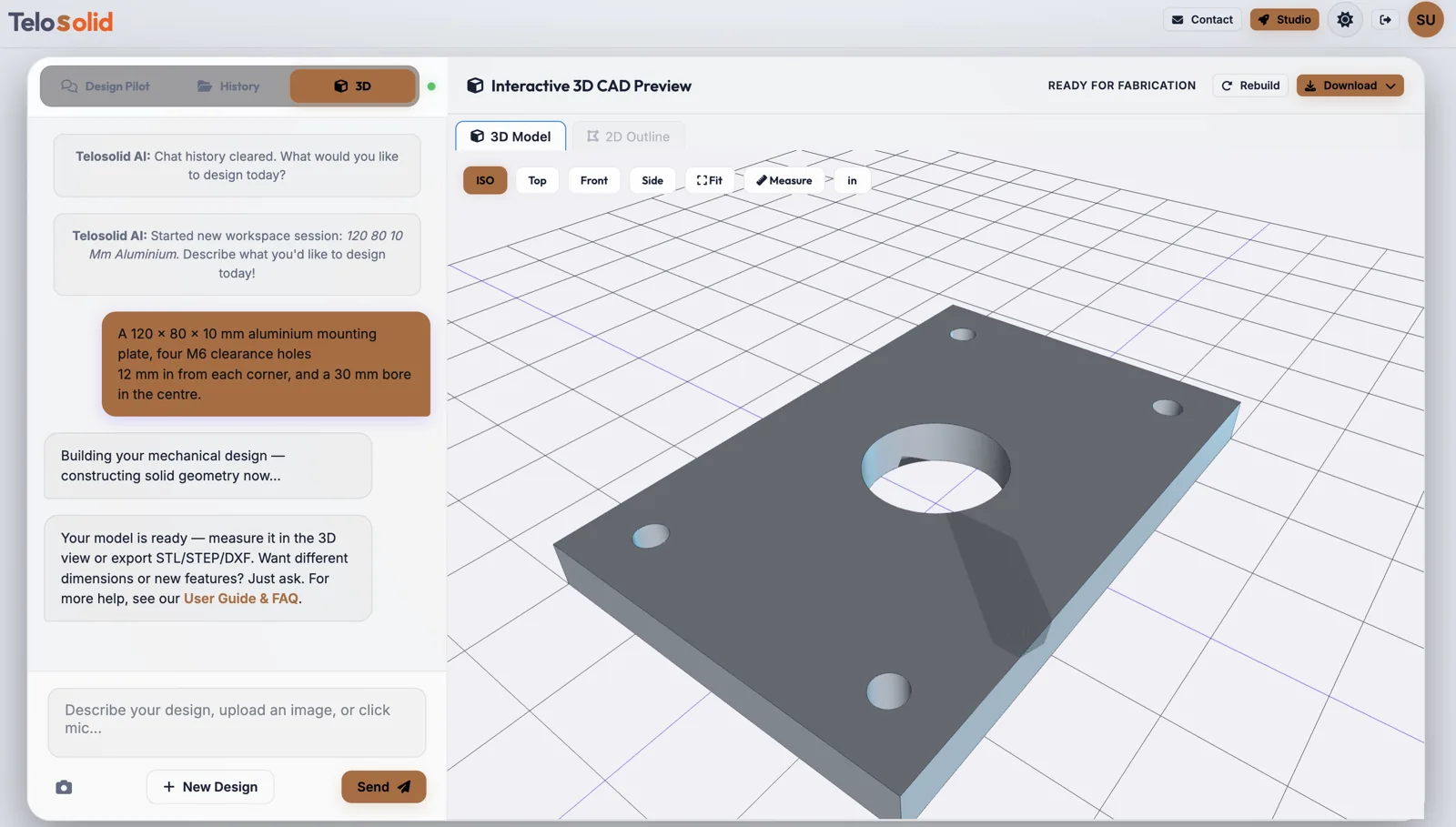
Interactive 3D CAD Preview
Complete your design conversation to construct your part here in real-time 3D
Type it, say it, or photograph it. You get a genuine 3D solid model in seconds. Download STEP for CAD, STL for printing, DXF for cutting, and a dimensioned PDF drawing your machine shop can quote from. No CAD experience needed. Free to start.
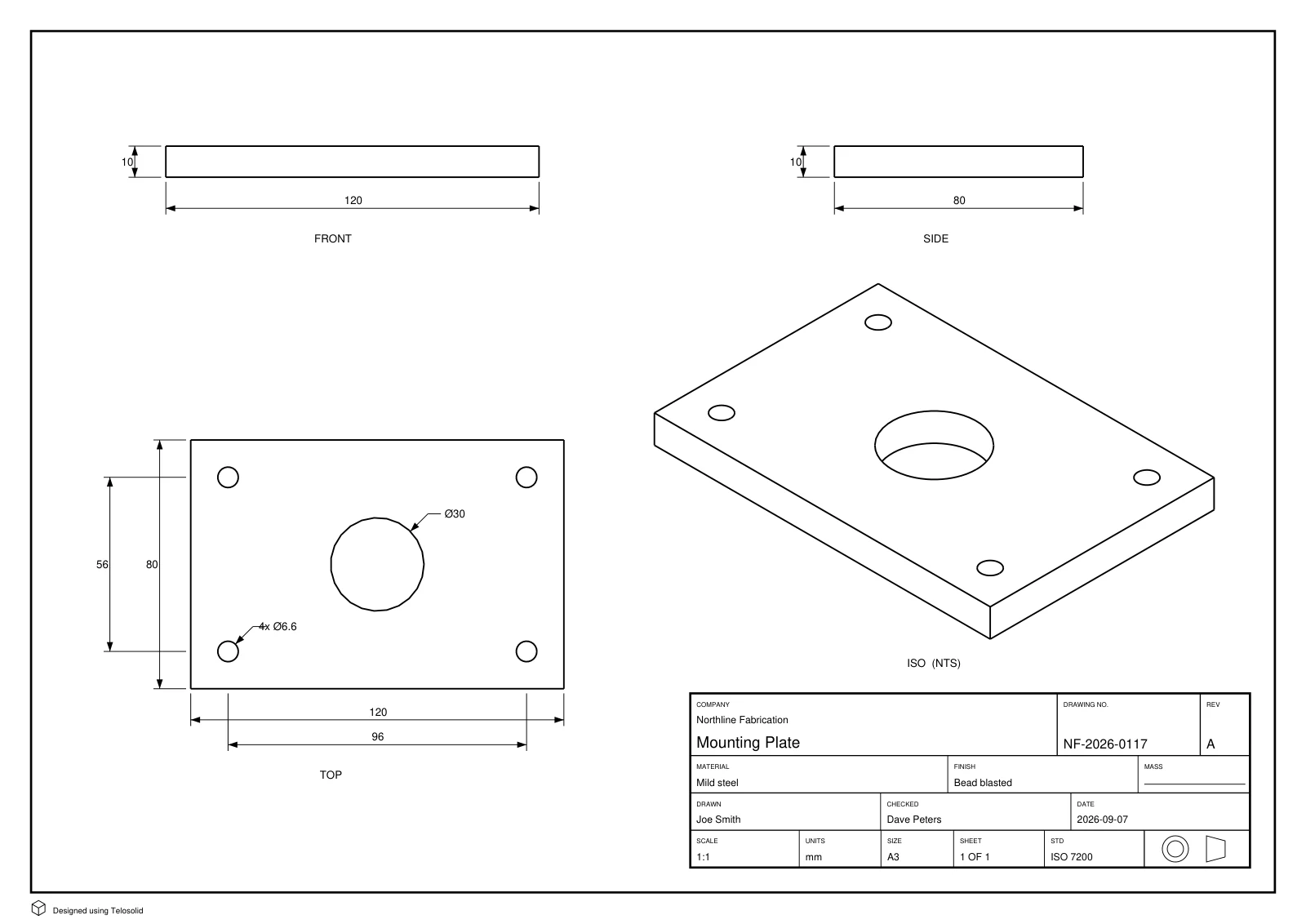
The complete workflow, demonstrated. All featured drawings, including the one below, are direct application outputs.
“A 120 × 80 × 10 mm aluminium mounting plate, four M6 clearance holes 12 mm in from each corner, and a 30 mm bore in the centre.”
Plain English, with sizes. Voice works too. So does a photo of a part or a sketch on paper.
A real solid is built, not a mesh approximation, and shown in an interactive preview. Something wrong? Say so in plain English and it rebuilds. “Make the bore 35 mm” is a valid instruction.
STEP to open in SolidWorks, Fusion or Onshape. STL to print. DXF to cut. Or a dimensioned PDF drawing: four views, measured from the solid, with a title block a shop can quote from, and a Drawing tab to add, remove and move dimensions before you send it.
Ø30,
4x Ø6.6 and the hole spacing measured from the solid rather than typed in.You get a true solid model with exact faces and edges: the same kind of geometry SolidWorks, Fusion and Onshape work with. Open the STEP file and keep editing it there. A mesh you can only print is not the same thing.
Describing a bracket takes one sentence. Modelling it by hand takes an hour and knowing which menu the fillet lives in. Change your mind and say so. It rebuilds rather than making you start over.
Photograph a part you need to replace, or sketch one on paper. Telosolid traces the outline and builds a clean, editable 3D model from it. Useful when the original drawing is long gone.
Available right now. Sign in and accelerate your engineering workflow.
Say the dimensions and features you want. Holes, bores, fillets, pockets, patterns and wall thicknesses, described the way you'd describe them to a colleague rather than as a feature tree.
How to write the promptUpload a photo of a real part or a hand drawing. Flat parts such as brackets, gaskets, plates and panels are built directly from the traced silhouette, which is the most accurate route there is.
How to shoot the photoSTEP for CAD and machining, STL for 3D printing, DXF for laser cutters, waterjets and routers. Every DXF is projected from the real solid, so it is dimensionally correct rather than a screenshot.
Which format for which jobAn A3 PDF with front, top, side and isometric views, dimensioned from the solid, and an ISO 7200 or ASME Y14.100 title block, in millimetres or inches. Then adjust it in the Drawing tab: add the dimensions your shop needs, delete the rest, move labels, add tolerances and notes. Your edits are saved.
See a sheet and the editor“Make it 10 mm thicker.” “Move the holes to a 90 mm pitch.” The design is rebuilt from its own history, so a change is a change rather than a fresh guess that loses everything else. Select one part first and the change applies to that part alone, leaving the rest of the assembly exactly as it was.
How to ask for changesEvery build is looked at from four sides and compared with what you asked for, and a clear mismatch is corrected before you have to spot it. Something still off? Press the eye button to attach exactly what you are looking at, and describe the problem.
How the check worksA housing and its lid are two parts, not one lump. Each is listed by name, selectable in the viewport, and can be hidden — and every export gives you exactly what is on screen, so hiding a part leaves it out of the STL, STEP, DXF and drawing too. Check fit tells you whether two of them clash, touch or clear, and by how much.
See parts in actionBring in a solid from any CAD system and work with it here: see it in the viewport, pick its parts apart, check how they fit, and export the ones you need as STL, STEP, DXF or a dimensioned drawing. Its units are read from the file and stated back to you.
Importing a STEP fileEvery session is saved to your account, and every build in it: reopen a part weeks later and go back to an earlier build in a click. Share a design as a view-only link — the person you send it to turns it in 3D in their browser and downloads it with a free account.
Build history and sharingCheck fit already tells you whether two parts clash, touch or clear. Next is the whole design in one pass: every pair checked, and the faces that are meant to mate found and confirmed, so an assembly is known to go together rather than checked a pair at a time.
Stress and thermal checks in the browser, so you find out a wall is too thin before you pay for the part rather than after.
A report card for the process you have in mind — 3D printing, laser cutting or CNC — with thin walls, overhangs and tool-unfriendly corners highlighted on the model before you send it out.
Free to start. The first useful model usually takes about a minute.
Sign in to your design environment
Thanks for signing up — your email is verified. We're enabling studio access as quickly as we can.
We're in beta and scaling up. Most accounts are approved within 24 hours — we'll email you when you're ready to go.
Read the User Guide & FAQ while you wait — studio tour, units, exports, and common questions.
Want to move up the queue?
A quick note via the contact form helps us prioritise you. Please include:
Choose a monthly plan for more design allowance
Questions, partnerships, or more design allowance — we read every message.
Constructing solid geometry in the design kernel
Update your workspace security credentials