
2D manufacturing drawings, generated
The document a machine shop actually quotes from: four views, dimensions measured from the solid, and a title block with your company, drawing number, revision and material. Then make it yours in the Drawing tab: add the dimensions a shop needs, remove the ones it doesn't, and move every label until the sheet reads cleanly.
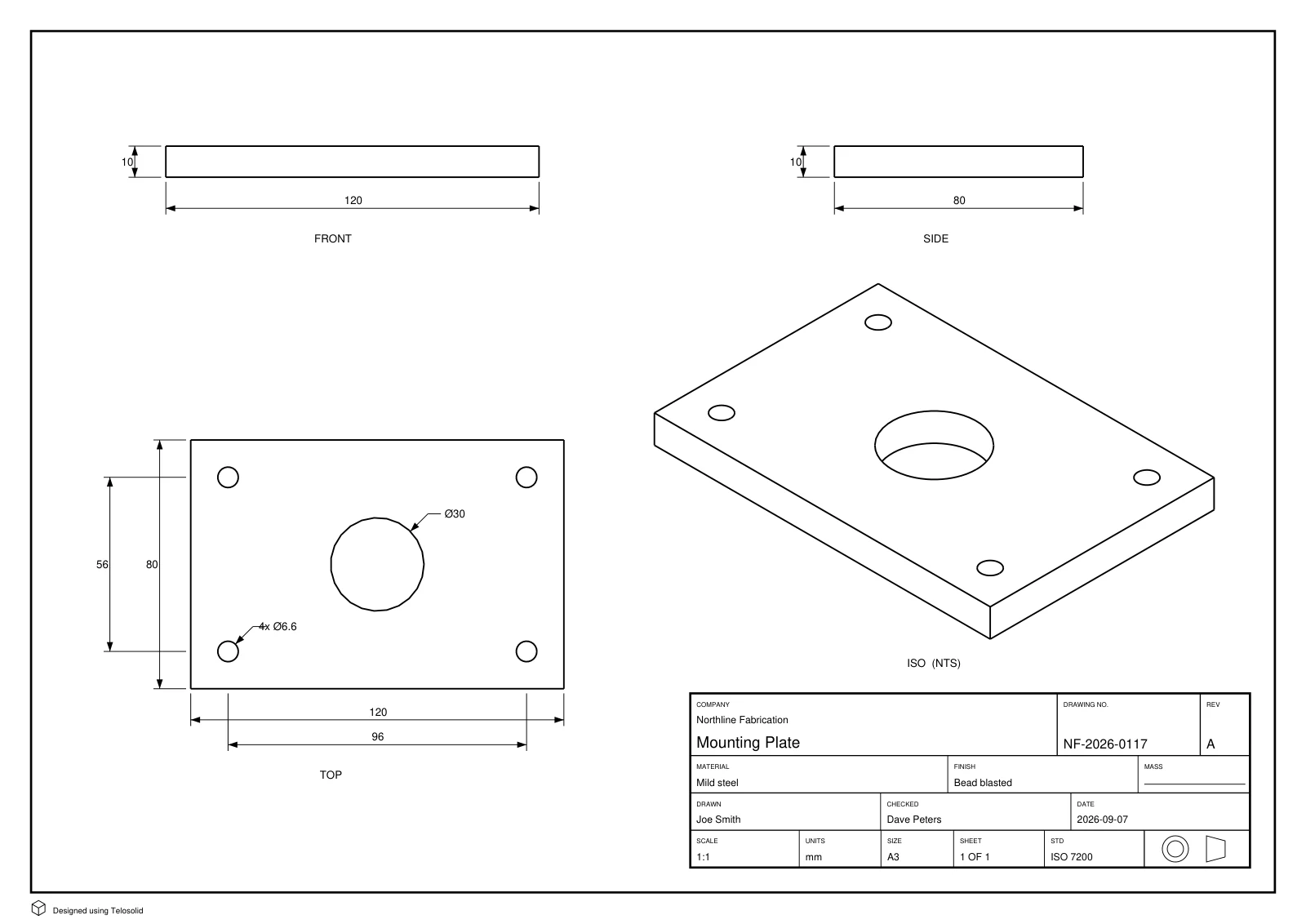
What is on the sheet
One A3 page carrying front, top, side and isometric views at a stated scale, laid out in a standard projection, with a filled title block. Specifically:
- Overall dimensions: width, height and depth, taken from the solid.
- Hole and bore diameters, grouped when several are identical: one
4x Ø6.6callout rather than four separate ones cluttering the view. - Hole-to-hole spacing, so a pattern can be set out without measuring off the page.
- A title block with company, drawing number, revision, material, finish, drawn by, checked by, scale, units, sheet size and the projection symbol.
Every dimension is measured from the real geometry. Nothing on the sheet is a number the part does not have.
Edit the sheet before you send it
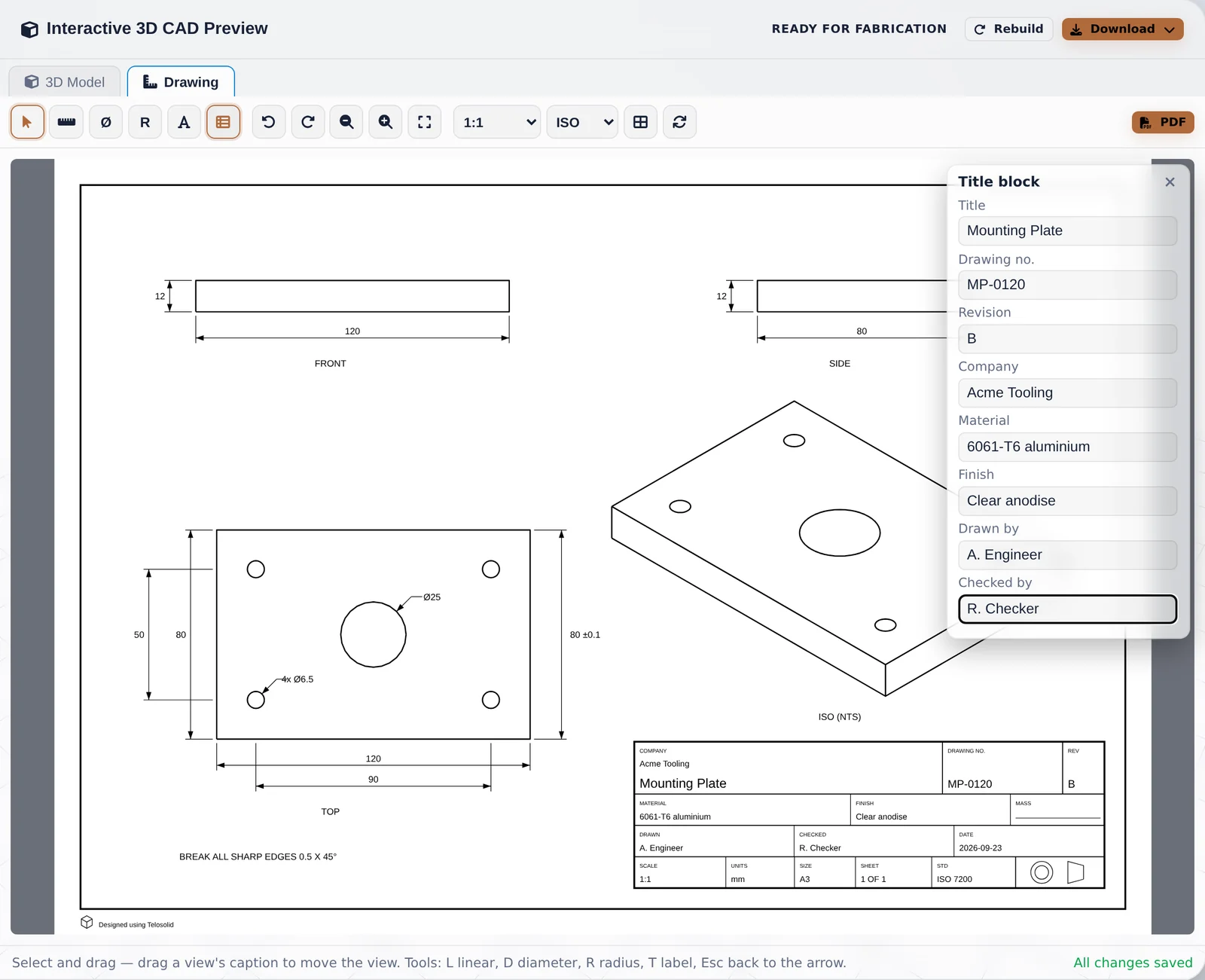
The automatic sheet is a first draft. It is always correct, but it cannot know which dimensions your shop cares about, or where a label reads best. So the drawing opens in its own Drawing tab, next to the 3D model, where you can change it:
- Add a dimension. Pick the linear tool, click two points on the part (clicks snap to corners and edges), then click where the dimension line should sit. Horizontal, vertical or aligned follows from where you place it. Diameter and radius tools add a callout to any hole or arc with one click.
- Remove one. Select it and press Delete.
- Move things. Drag a dimension, a label or a whole view. Dimensions stay attached to the geometry they measure, so moving a view moves its dimensions with it.
- Add tolerances and notes. Replace a dimension's text with
40 ±0.1, or add a free label such as BREAK ALL SHARP EDGES, with a leader arrow if it points at something. - Fill the title block, change the scale, switch between ISO and ASME, or print the dimensions in millimetres or inches; the views re-arrange themselves.
Overlapping labels are outlined in red before you export, so a clash is spotted on screen rather than on the shop floor. The measured value is always recomputed from the part: an edited label changes what is printed, never what was measured.
Your edits are saved. Close the tab and come back next week, and the drawing is exactly as you left it. Change the design and rebuild, and the new drawing keeps your title block and notes and measures the new geometry afresh.
First angle or third angle, and why it matters
The two conventions are mirror images. In first-angle (ISO, common in Europe and much of the world) the top view is drawn below the front view. In third-angle (ASME, common in North America) it is drawn above.
A shop that reads a third-angle drawing as first-angle will machine features on the wrong face. That is why every sheet states its convention in the title block and carries the truncated-cone projection symbol, which says the same thing in a form any drawing office reads at a glance.
You choose the standard in the Drawing tab, and can switch at any time, so the sheet matches whoever will read it.
From model to drawing
- Have a model. Describe the part, or build it from a photo.
- Open the Drawing tab above the 3D view. The first time, the part is measured and laid out on the sheet; that takes a few seconds.
- Review and adjust: add, delete or move dimensions, add tolerances and notes.
- Fill in the title block: company, drawing number, revision, material, finish. Anything left blank prints as an empty labelled box, so the reader knows to ask rather than assuming it was removed.
- Export the PDF and send it with your STEP file.